Showing posts with label Computers. Show all posts

Wednesday, January 20, 2010

Apple Tablet FACTS and Controversies


Well, most of you might have heard about the Apple Tablet... or have seen pictures of it.
Some have seen it and didn't know what it was called, well, not a lot of people do know
what's called. However, some people, including myself, know that it is true and there is
going to be an Apple Tablet... and it's going to be announced January 27, 2010 at Apple's
newest conference in San Francisco.

Many rumors have been thrown around and have surfaced over the period of about 1 - 3
months prior to today. Some popular rumors have been about the design, when it will be
released (not just announced), what it's like as far as pricing goes, will it be full
touch-screen / does it have multi-touch capabilities, does it have a new OS, etc. Well,
I'm here to give you a piece of my mind about these rumors, and some of the things I think
about it.

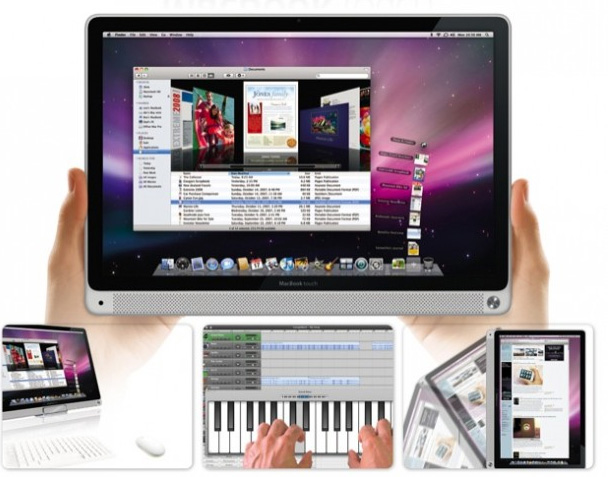
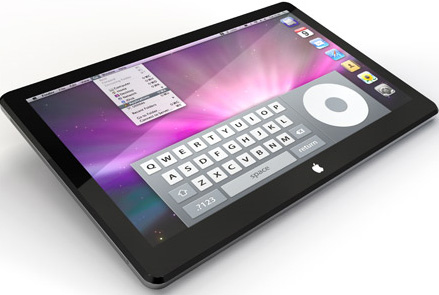
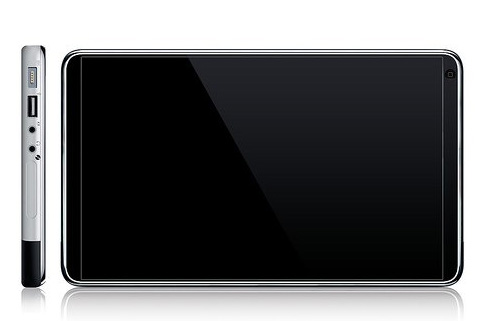
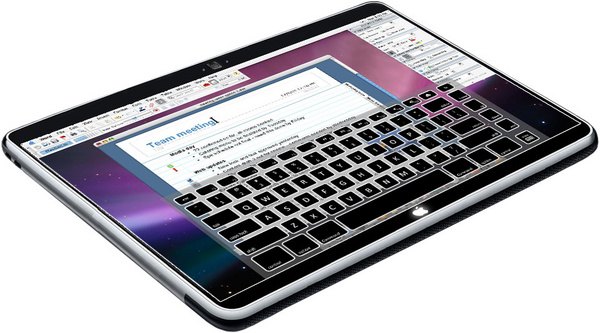
Alright, here are some of the most popular images being spreading around the internet
of what Apple's new Tablet Computer:

A few names that have been seen around the web are:
"The Apple Tablet"
"iSlate"
"iPad"
"iTouch Computer"
"MacBook Touch"
"iTablet"
... and many more.

Some people say that it is going to have all the new Operating Systems that all other Macs
have, nothing special. On the other than, it would have to have the touch/multi-touch screen
capability enabled on it's OS... am I right?

Personally, I believe the rumor as far as the pricing goes, along with the rumor of how those
images above on the outward design of it. Many have said the Tablet will be a less pricey
device compared to other Macs so far. Rather than being a $2500 piece of equipment, it is
thought to be more like a $1000 device... hope this is true for many, myself included.

Apple sure has surprised many with the announcement about this new futuristic device/computer...
especially since they had previously said that they were going to be working on the iProducts that
already have running, such as iPhone Updates, (which seem to have been getting less and less
frequently now that we have heard about this Tablet... hmmm, wonder why?), iPods, etc.

Hope to see some of you guys there at the Apple Conference! ... that is if I can get in again :)
Until then keep bloggin, vloggin, and spreading the word of Tech!
-Chris Voeltz
http://www.truegamestudios.com

Wednesday, January 13, 2010

Apple's Tablet "iSlate"


apple-tablet-montage

We round up all of our knowledge and all of the rumors of Apple's tablet PC.

There have been so many rumors, dates, names and details creeping around the Web about Apple’s highly-anticipated tablet PC, or “iSlate” as many are calling it. Even though the lack of facts and excess of gossip have been rather irksome—we are still enjoying the process of piecing together the specs of this new device. Unlike Apple, we like to share our information, so we rounded up everything we know and have heard about Apple’s new tablet PC.

The Name

The rumor mill has been buzzing over Apple’s new tablet and what it will officially be called. The most feasible option is the “iSlate” theory. Apparently, Apple bought the domain name “iSlate.com” in 2007. Now, why would Apple do such a thing? We going to go ahead and say that Apple had to make a claim on that combination of the “I” prefix and the word “slate” for a product. Tablet PCs have been around longer than people think, but that genre of device usually gets overshadowed by high-powered smartphone and high-end laptops—essentially rendering it irrelevant.

Another naming option—a more recent development—is the “Apple iGuide.” We know, it’s definitely not as catchy.According to MacRumors, iGuide Media, LLC. is another Delaware-based company that obtains trademarks on behalf of Apple, Inc. Apparently this company has a single trademark application for the term “iGuide” that is currently pending. Other options are the “iPad,” which sounds kind of cheesy and too much like iPod, and the “TabletMac,” which would be the shabbiest name Apple could come up with if this rumor is true. Apple supposedly did register a trademark for the “TabletMac,” but we think it might be one of Steve Jobs’ little trademark jokes.

appletabletHardware

One of the biggest Apple tablet debates is over the actual size of the tablet display. There are a couple options with the smallest being 7-inches and the largest measuring at 10.6 inches. The highlight of today was when an anonymous source (of course) told the press that Apple has pre-ordered all 10.1-inch LCD and OLED displays from suppliers all over Asian. And many sources reported last week that 10-inches may be the lucky number. TheFinancial Times, Gizmodo and Reuters all say it’s 10 inches. The WSJ says it will sport a 10 to 11-inch touch screen—but we’re going to count them in the 10-inch group as well.

Apple told Australian publishers that the tablet is “small enough to carry in a handbag but too big to fit in a pocket.” Thanks for the fun riddle Apple, but the majority of the public is still irritated with your secrets. Another theory to settle this size debate comes from Digitimes who claims there will be two tablets, one that’s 9.6 inches (with OLED) and another that’s 10.6 inches (with LCD). That would explain why apparently all of Asia was cleaned out of 10-inch LCD and OLED displays.

When it really comes down to it, all we really have to go on is Apple’s iSlate haiku—“small enough to carry in a handbag, but too big to fit in a pocket.” Just try to picture an over-sized iPhone.

apple-tabletSoftware

To be very honest, there hasn’t been much talk of what’s going on inside of the Apple tablet. Most sources point to a 3G version, but some who are on the dual-tablet bandwagon claim one version will have 3G connectivity and another will not. Also, most industry insiders believe it will use Verizon LTE 4G wireless network. About a month ago there were rumors flying that the iPhone could be coming to Verizon’s network, but now with the confirmation of many sources we think that Apple’s tablet will be making an appearance instead.

In terms of a processor, most tech experts and rumor-mill followers are leaning toward the tablet using PA Semi chips, Apple’s in-house chip company that it purchased in 2008, and that are possibly ARM-based.

The inside of the Apple tablet is still quite mysterious—even more so than the rest of it.


apple-ipad-conceptSpecial Features

Well, a lot of the rumors that come pouring in about the Apple tablet could be classified as “special features” because it seems only the random, minuscule details get leaked through the wire. The WSJ reported that there will be two finishes on the tablet—perhaps a flat matter style and a shiny, glossy style. Basically just like the iPhone 3GS.

Another intriguing feature that was leaked this week came from France—Orange exec Stéphane Richard said “Oui” when asked if the tablet had a webcam. Richard confirmed that the iSlate will be equipped with a webcam (even though he semi-denied it today) and that the new tablet PC will be revealed at Apple’s January 27th press conference. The tablet is also supposed to have unlimited Wi-Fi access.

Many industry experts and Apple insiders’ prophesize that this tablet will be the device to end all other devices. The Apple tablet will be so multifunctional that it will put high-end laptops and eReaders to rest.

islate-tabletPrice and Availability

The price of this mythical tablet hasn’t fluctuated as much as we would have guessed—many sources, including the WSJ, have predicted $1000 for the initial price tag. Other insiders are guess a little bit cheaper: Gizmodo claims it will be between $700 and $900, while DigiTimes argues it will be over $1500 due to the OLED upgrade.

As for availability—we know it will be announced on January 27th at Apple’s press conference in San Francisco, but as for an actual arrival date we still aren’t certain. The WSJ says the tablet will ship in March of this year. And according to Digitimes, Foxconn is supposed to have a half a million of the devices shipped by April. Since the January press date is coming up soon, we won’t worry too much over the availability—we have faith Steve Jobs will cute us a break and reveal a release date.

apple-tablet-concept-2Possible Looks

We’ve scattered a number of possible iSlate/Apple tablet mockups throughout this article. The styles are very similar.


If you have any more news, rumors, or even ideas about what Apple may have in store for its tablet PC, write a comment and tell us about it.


What do you think about these ideas and rumors?

Saturday, May 9, 2009

Epic Pet Wars.com

Well, so I believe you already know this, but I am a major Apple fanatic... only, I don't really like Apple.  Instead, I love their products, but I like their Jail-Breakable Firmware on their iPhones and iPod Touches.  ;)  I, of course, have a 2.2 Jail-Broken iPod Touch 16gb... which is fantastic!

Anyway, so there is this app, that I got for free, from Installous (from Cydia/Icy) that allows you to get all the Apple App Store apps for free... SO, I went in it and took a peak.  Much to my surprise, I found something very interesting that caught my attention... the 2.2.1 firmware required App, Epic Pet Wars.  Now, for those of you who have a JB'd iPhone/iTouch, you can download Installous from the Repo:
  • http://cydia.hackulo.us
then download the Epic Pet Wars app from it for free... I have the 400 Respect one ($20.00 in the App Store) and have played it for hours in the last night I've had it ;).

ANYWAY, aside from all of that I want to tell you about the Game itself.  It is a flash game, but a very fun one.  You adopt a pet, and battle others, train on quests, equip your pet with the vast amount of equipments, useables, and acessories in the Shop... along with using your Respect points to buy things from the Battle Master.

Well, my invitation for you to join my Posse, which will be under your name, so I guess your Posse, and dominate EPW!

Let me join you at:
And my Friend Code to let me join you is:
  • oqb8kl
Which you can add me here:
Thanks so much for reading my ramblings!  ;)

Thursday, May 7, 2009

How to install themes to Vista Home Premium (ONLY)

Hey guys, just wanted to give you a short and easy tutorial/howto on installing themes to Vista Home Premium.  This tutorial is just for Home Premium, I have another one for all other versions of Vista Home "..." they are on my Channel on youtube, which you can access here.

There are a few ways, but the easiest, and the one that finally worked for me and 5 of my friends who tried it, was by going with VistaGlazz.  Now, some of you may have heard bad things about this program, well so have I, and have found out that 9/10ths of them are untrue and inaccurate.  So, with that said, lets begin.

What you will need:
  • Windows Vista Home Premium Operating System (usually a 64-bit and x86)
  • Internet Access
  • Access to downloads (ask your Administrator for access, if not)
  • 1.2mb of freespace on your computer
  • Small amount of knowledge of Vista
  • A few minutes ;)
What you need to do:
  1. First you need to download VistaGlazz, which you can download here.
  2. Install VistaGlazz.
  3. Execute/Run VistaGlazz once it is installed.
  4. Click the second button, "Shows the status of your Aero file".
  5. It will patch them for you, and then you will be able to install themes.
Now that they are patched, you can search the web for some .theme/.msstyle files, or you can just go to the one I like/use the most... you can go to it here.

You can choose your own themes, but the one I will be using is here. <-- Go there and download that.  Now, extract that .zip/.rar file to your desktop (this is temporary).  Now it is a folder.  Now open that and find the .msstyle file, and copy it to your desktop.  Now, you will navigate to: 

"C:\Windows\Resources\Themes"

Once you're here, drag the Folder and the .msstyle file into this, and it will prompt you to continue (this is the Administrator required privilege part), click continue and they will be placed in there.  Finally, you can apply this theme two ways:
  1. Double click the .msstyle file and it will open it in your Theme Settings dialog box, then just click Apply, and you're all set with your theme! Enjoy!
  2. OR You can: Right Click your desktop > Personalize > Window color and appearance > open classic appearance properties for more color options.  You will see Appearance Settings, and you will see Windows Aero and Windows Vista Basic, only multiple ones.  Select through them until you find that theme, if they all look the same (the Aero ones), just apply each one, and see what one is it. ;) Enjoy!

Note: #5: The patching of these files do nothing to your computer, other than updates them to the usable state.

Screenshots: You will see this, once it is running.  Along with this, this, this, and this.

Hope this helped you!

NOTE: I will have a video up within the next few days to go step by step with. :) Enjoy

Awesome Subscribers